
rmResident
LCSProductivity
3.92.16K Reviews
- Version
- 1.54
- Installs
- 500.00K
- Age Rating
- Everyone
Screenshots
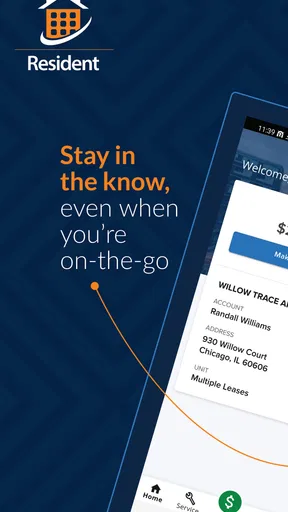
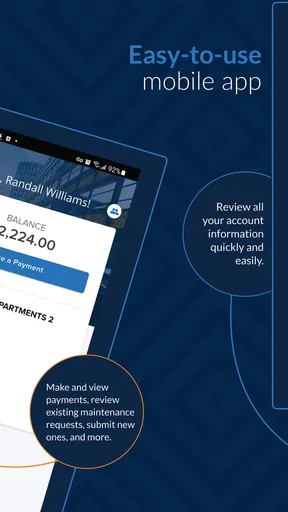
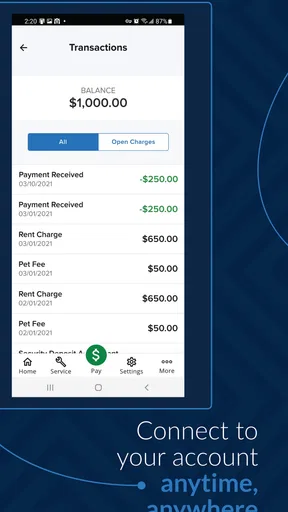
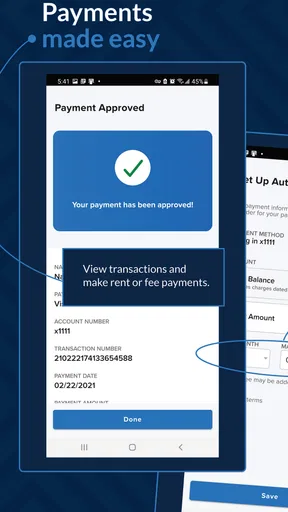
Our Review of rmResident
 Analysis by Appyee
Moving into a new home often means learning a small collection of digital tools at the same time: one for building notices, another for maintenance requests, and sometimes a separate way to handle payments. rmResident is designed to bring those resident tasks into one mobile app. In my experience, its appeal is less about doing something flashy and more about reducing the number of small errands that otherwise require a call, a website visit, or a search through old messages.
This is a free productivity app from LCS, aimed at residents who need to view payments, deal with service issues, and keep up with practical matters connected to where they live. It is available for everyone in terms of content rating, and it has reached over 500 thousand installs. That level of adoption suggests it is not an obscure experiment, although the average score of 3.9 from around 4.7 thousand ratings also tells me that the experience may depend heavily on how a particular residential community uses it.
Getting from installation to a useful first result
I’d treat the first session as a small, practical check rather than a tour of every screen: confirm the residence is linked correctly, then choose one task you genuinely need to handle. That keeps the setup grounded in your own housing routine and makes it easier to spot whether the app is useful for your community. From there, the next section looks at what to do when a screen or status seems unclear.
What to expect before you begin
The most important thing to understand is that rmResident is not a general money-management app or a universal maintenance marketplace. Its value comes from its connection to your residential account or community. In practical terms, the app is most useful when your landlord, property manager, or housing provider already supports it and has given you the details needed to connect your residence.
That distinction matters for first-time users. Installing the app alone does not necessarily create a complete experience. You should have the resident information supplied by the organization managing your home nearby before starting. If you are downloading it simply to explore, you may not see much that is meaningful until the account connection is complete.
I would approach the first launch with one modest goal: get access to the correct resident profile and confirm that the app recognizes your home. Trying to investigate every section immediately can make the process feel more complicated than it is. Once the account is connected, the useful questions become straightforward: Can I see the payment information I need? Can I report a service problem? Can I return later and find the status or details without starting over?
The app belongs in the productivity category because it handles recurring household administration rather than entertainment. That makes it a good fit for people who want a single place to check resident-related tasks from a phone. It is less suitable for someone looking for budgeting tools, bill comparison, document storage, or a broad personal finance dashboard.
Setting up the account without unnecessary friction
After installing rmResident, I recommend taking the setup slowly and reading each field carefully. The first practical hurdle is usually not the interface itself but identifying which resident details belong to the account. If your household has several occupants, make sure you use the information associated with the correct resident record rather than assuming any name or unit detail will work.
A useful habit is to keep your welcome material, recent housing correspondence, or payment notice available while setting up. That avoids repeatedly leaving the app to search for a reference. It also helps prevent a common mistake: entering information from an old residence or using details that identify another member of the household.
Once you reach the main area, spend a minute checking whether the displayed residence and account information look right. This is a small step, but it is more valuable than immediately tapping through every menu. If the wrong property or incomplete profile appears, making a payment or submitting a service issue before fixing the account could create avoidable confusion.
The current version is 1.54, and it supports devices running Android 6.0 or later. That makes it accessible on many older Android phones, which is helpful for residents who do not upgrade devices frequently. Still, compatibility is not the same as comfort: on a small or older handset, entering long descriptions or reviewing several payment details may feel slower than doing the same task on a larger screen.
I would also treat notifications as a practical part of setup rather than an afterthought. If the app offers alerts related to resident activity on your device, allowing the useful ones can make follow-up easier. At the same time, I would avoid enabling every alert automatically if you prefer a quiet phone. The right balance is to receive reminders that help you act, not a stream of messages that you stop noticing.
Your first successful action: checking a payment
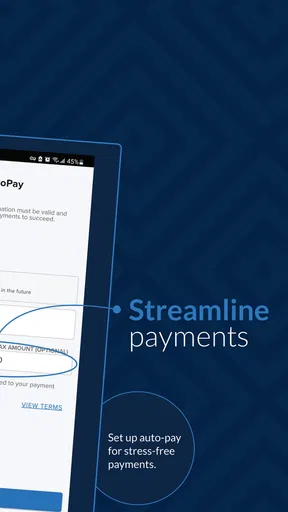
The clearest first success is to open the payment area and verify that the information matches what you expect. Do not begin by assuming the app replaces every payment method you have used before. Instead, look at the available instructions and confirm the amount, account context, and any timing details shown for your residence.
This is where the app can be more convenient than a paper notice or a general browser bookmark. When the relevant information is already associated with your resident profile, you can check it from the same place you use for service matters. That reduces the chance of searching through several unrelated messages when you need a quick confirmation.
A realistic example is a resident who is about to leave for work and remembers that a housing payment needs attention. Rather than opening a laptop, locating the property management website, and trying to remember which login applies, they can open rmResident, review the resident payment section, and decide what action is needed. The time saving is not dramatic every day, but it becomes meaningful when the alternative is a chain of small steps.
Before completing anything important, compare the details with your usual records. The app is a convenient access point, but convenience should not replace a quick check. If a figure or account detail looks unexpected, pause and contact the relevant housing office through its normal support route instead of repeatedly submitting the same action.
One useful workflow is to use the app for visibility even when you prefer another established payment method. Some residents may want to make payments through a bank service or another approved channel while using rmResident to check what is due or confirm resident-related information. Whether that works depends on the arrangements for your home, so I would follow the instructions shown for your account rather than assuming every option is interchangeable.
Reporting a service issue clearly
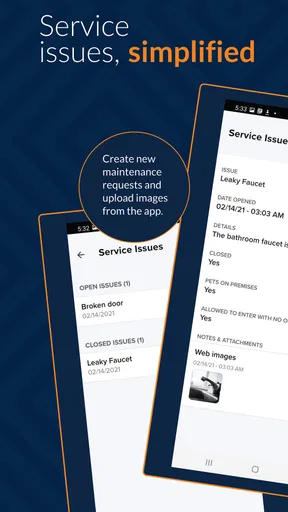
The second important use is submitting a maintenance or service issue. This is where careful writing matters more than speed. A vague message such as “the heating is broken” gives the person handling the request very little to work with. A better report explains what is affected, where it is happening, when it began, and whether the problem is constant or occasional.
For example, instead of writing only “water problem,” I would describe the exact fixture or room, what I observed, and whether the issue is getting worse. If the app allows supporting details, include practical information that can help someone understand the situation without asking the same basic questions again. Keep the wording factual and avoid combining several unrelated repairs into one unclear description.
This is one of the less obvious strengths of using a resident-focused app: the request is tied to the housing context rather than being sent as a loose email. That can make it easier to keep the issue connected to the right home. The trade-off is that a form may encourage residents to expect instant resolution when the app is really only the reporting and communication channel.
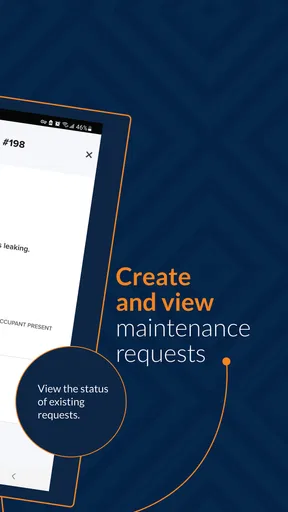
After submitting a request, save or note the relevant reference information if the app presents it. I would not rely only on memory, especially for a problem that may require a follow-up. If the issue affects safety, causes serious damage, or needs immediate attention, use the emergency contact process provided by your housing organization instead of assuming a normal in-app request is enough.
Common confusion around payments and service requests
The most likely misunderstanding is treating every item in the app as if it has the same status. A payment record, a service request, and a message from a property manager are different kinds of information. A payment view may confirm financial activity, while a service request may simply show that a problem was reported. Seeing an entry does not automatically mean that the underlying issue has been resolved.
I also recommend checking the wording around dates and status before taking action. Residents sometimes interpret a displayed date as a deadline when it may refer to a transaction or update. If the meaning is not obvious, compare it with the original notice or ask the housing provider. A few seconds of checking is preferable to making a duplicate payment or sending repeated repair requests.
Another source of friction is shared household access. If more than one person manages the home, decide who will submit service reports and who will check payment information. Otherwise, two people may report the same leaking tap or assume the other person handled a payment. The app can centralize information, but it cannot automatically resolve household communication habits.
There is also a practical privacy consideration. A phone used by several people may expose resident or payment information if the device is left unlocked. I would use the phone’s normal security features and avoid casually handing the device to someone while the app is open. This is not a reason to avoid the app; it is simply part of using any resident account on a shared device.
Where it compares well with usual alternatives
Compared with calling a property office for every small question, rmResident offers a more self-service approach. You can check information when the office is closed or when making a call would be inconvenient. Compared with a general email inbox, a dedicated resident workflow can make it easier to separate household administration from work, shopping, and personal messages.
Its advantage over a regular browser shortcut is mainly focus. A browser can reach a housing portal, but it also leaves you managing tabs, saved passwords, and unrelated pages. A purpose-built mobile app is more natural for quick checks and short service reports. For residents who already use a well-designed web portal, however, the difference may be small, especially if they prefer a larger screen for reviewing details.
The app is not the best alternative for every situation. Someone who wants detailed spending analysis, automatic budgeting, shared financial planning, or a complete archive of household documents will probably need a dedicated finance or organization tool as well. rmResident is narrower, and that narrowness is both its strength and its limitation.
Making the app useful after the first task
Once the first payment check or service report is complete, I would use rmResident as a regular reference point rather than opening it only during a crisis. A quick periodic check can help you notice updates, review outstanding issues, and keep resident administration from becoming a last-minute chore.
One practical technique is to create a simple personal routine around it: check the payment area when you normally review household expenses, then look at open service issues separately. Keeping those two activities distinct makes it easier to notice whether you are reviewing information or actually expected to take action.
For maintenance, write down the date you reported a problem and the key detail included in the request. If the issue continues, your follow-up can be precise instead of emotional or repetitive. Mention what changed since the original report and refer to the existing request if the app provides a way to do so. This creates a clearer history for both you and the person handling the case.
I would also avoid using the app as the only place where you remember important housing obligations. If a payment or repair is especially important, keep your normal personal reminder as a backup. A resident app can simplify access, but phone changes, account problems, or missed notifications can still interrupt your routine.
For a first-time user, the path is reassuringly simple when approached in the right order: connect the correct residence, verify the profile, inspect the payment information, and then submit one clearly written service request if you have a genuine issue. Those steps reveal what the app can realistically do without encouraging unrealistic expectations about instant support.
Who should use it and who should skip it
I would recommend rmResident to residents whose housing provider actively uses it and who want mobile access to payments and service matters. It is especially useful for people who are often away from home, dislike phone calls, or need a straightforward way to keep resident tasks separate from their main banking app.
It can also suit older Android phone owners because the minimum operating system is Android 6.0 or later. The free price removes an obvious barrier to trying it, and the Everyone age classification makes it appropriate for a broad household audience. Those facts do not guarantee that every community will offer the same level of functionality, so the quality of your experience will still depend on how your residence is connected to the service.
I would skip it as a primary tool if your property manager does not support the platform, if you need advanced personal finance features, or if you strongly prefer handling everything from a desktop portal. I would also avoid relying on it for urgent emergencies unless your housing provider explicitly directs residents to use it for that purpose.
My overall impression is that rmResident works best when treated as a focused resident-access tool rather than a complete household management system. Its strongest moment is the ordinary one: checking a housing payment or reporting a repair without searching through old correspondence. Its limitations become clearer when you expect detailed financial analysis, guaranteed instant responses, or a replacement for every existing support channel.
With a 3.9 average from around 2.2 thousand reviews, the reception is reasonably positive but not flawless. That feels consistent with the kind of app this is: useful when the account connection and local property workflow are working smoothly, but capable of causing frustration when information is unclear or a resident expects the app itself to solve an issue.
My recommendation is to install it if your housing provider points you toward it, complete the account check carefully, and judge it by one real task rather than by the number of menus it offers. If that first payment review or service report is clear and easy to revisit, it can become a convenient part of your household routine. If your community does not actively support it, a direct contact method or established web portal may remain the better choice.
Verdict
Strengths of rmResident
- Quick access to resident services and community information.
- Convenient way to submit and track maintenance requests.
- Helps residents receive important building announcements.
- Reduces the need for phone calls or in-person office visits.
- Centralizes useful property-related details in one place.
Limitations of rmResident
- Features may vary depending on the supported property or management company.
- Some requests may still require follow-up with the management office.
- Notifications can be missed if app permissions are disabled.
- Account setup may require information provided by the property manager.
- Performance and usefulness depend on the quality of the building’s integration.
Similar Picks in This Category
View All
Google Calendar
Google LLC4.6

Google Drive
Google LLC4.3

Google Assistant
Google LLC3.9

Microsoft OneDrive
Microsoft Corporation4.6

Samsung Calendar
Samsung Electronics Co., Ltd.4.1

Microsoft OneNote: Save Notes
Microsoft Corporation4.6
Frequently Asked Questions
What is rmResident, and who is it designed for?
rmResident is a mobile application intended for residents who need a convenient way to access services, information, and communication related to their residential community or property. Depending on the organization using it, the app may provide announcements, maintenance requests, documents, notices, and contact options. Available features can differ between buildings, housing providers, or communities, so users should confirm that their property supports rmResident before downloading.
How do I sign in to rmResident for the first time?
First-time access generally requires account details supplied by your property manager, housing organization, or community administrator. After installing rmResident, enter the requested email address, resident ID, invitation code, or password, depending on the login system in use. If you have not received activation information, or your details are rejected, contacting the property office is usually necessary because app support may not be able to create resident accounts.
What can I do with rmResident after logging in?
The available tools depend on how your residential provider has configured the application. In a typical setup, rmResident may let you read community announcements, submit or track maintenance requests, view important documents, receive notifications, and contact management. Some communities may also enable payment information, amenity reservations, package updates, or event details. It is worth checking the feature list for your specific property because not every account includes every function.
Does rmResident require an internet connection, and what permissions does it use?
rmResident normally needs an internet connection to sign in, retrieve updated community information, send requests, and receive current notifications. The application may request permissions such as notifications, camera access for attaching photographs to maintenance reports, or access to files for uploading documents. These permissions should be reviewed carefully and enabled only when needed. Limiting permissions may affect certain functions, but the core app may still open and display previously loaded information.
Is rmResident free, and is my personal information secure?
The application is generally provided to residents without a separate download charge, although any rent, service, amenity, or community fees shown inside the app are determined by the property provider rather than by the app itself. Because rmResident can handle resident contact details, requests, and documents, users should review its privacy policy and their provider’s data practices. Use a strong password, keep the app updated, and avoid sharing login credentials with others.
